
Pixian
Image & DesignPixian is an AI image background removal tool that supports free, high-resolution processing and can be used without registration, making it suitable for quickly completing cutouts and image background removal.
About
Overview
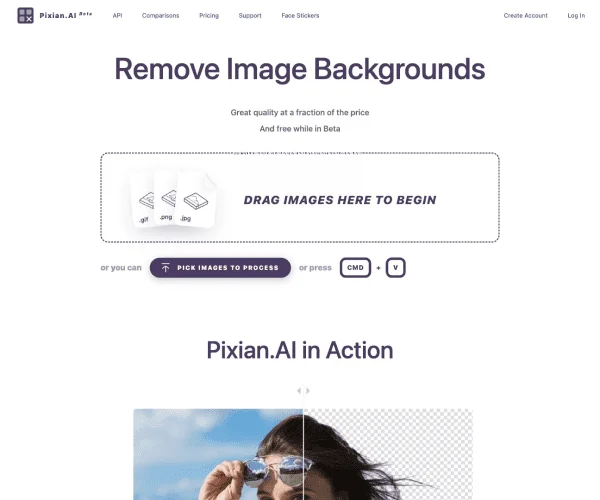
Pixian is an AI image processing tool focused on image background removal, featuring "free, no registration required, fast to use." After users upload an image, the system automatically identifies the main subject in the picture and removes the background, outputting either a transparent-background image or an image with a specified background color. It is suitable for scenarios such as product image processing, portrait cutouts, avatar creation, and social media visuals.
Based on the information on the official website, Pixian’s core advantages lie in its simple operation, straightforward processing workflow, and a certain degree of control over output parameters. For users who want to quickly complete basic cutouts without installing complex software or manually refining details, this type of tool can clearly save time.
Main Features
-
AI automatic background removal
- Automatically identifies the image subject and removes the original background, suitable for quickly generating images with transparent backgrounds.
-
No registration required
- Images can be uploaded and processed directly, lowering the barrier to use and making it suitable for temporary or lightweight needs.
-
Supports transparent and solid-color backgrounds
- Output background options include:
- Transparent
- White
- Custom solid-color background
- Output background options include:
-
Supports multiple output formats
- Can be exported as:
- PNG
- JPEG
- Can be exported as:
-
Adjustable output quality and size
- Supports setting JPEG quality.
- You can choose to keep the original image size or output to common size presets, such as:
- 1920×1080
- 1080×1920
- 1200×1200
- Also supports custom scaling by width or height while maintaining the aspect ratio.
-
Cropping and margin settings
- You can choose not to crop, or to crop automatically based on the subject.
- Supports adding blank margins by a certain proportion or number of pixels, making it easier to generate product images or avatar assets that are more suitable for display.
-
Vertical alignment and filename suffix settings
- Supports setting the subject’s vertical alignment on the canvas, such as centered or bottom-aligned.
- You can choose whether to add a suffix to the output file.
-
Batch download and preset parameters
- The official website interface shows support for "DOWNLOAD ALL" and preset schemes, making it easier to improve efficiency during repeated processing.
Product Pricing
According to the currently visible information on the official website, Pixian provides free usage and emphasizes no subscription required. At the same time, a "Buy Credits" entry appears on the page, indicating that the product may provide a credit-based or paid quota mechanism for processing scenarios with higher demands.
The currently publicly captured content does not show a complete price list. For the actual billing method, free quota, and high-resolution limits, it is recommended to refer to the latest explanation on the official website.
FAQ
-
Does Pixian require registration?
- The official website title clearly states "No Signup," which usually means basic usage is available without registration.
-
Can Pixian output a transparent background?
- Yes. The page provides a "Transparent" background option, which is suitable for exporting transparent-background PNGs.
-
Does it support high-resolution image processing?
- Based on the existing introduction and the parameter settings on the official website, it supports controlling output size, but the specific resolution limit is subject to the actual upload and processing rules.
-
Who is it suitable for?
- It is suitable for e-commerce operators, designers, content creators, students, office users, and people with everyday cutout needs.
-
Can Pixian replace professional photo editing software?
- It is very practical for quick background removal and basic image processing, but if complex edges, detailed refinements, or advanced compositing are involved, professional design software may still be needed.
Related Tools
View allHayo is an all-in-one tool that brings together multiple AI capabilities, covering areas such as AI art and information, making it convenient for users to experience various AI application capabilities including generation, browsing, sharing, and expression through a single entry point.
Openart is a creative platform that aggregates AI artwork and prompts, featuring a large collection of images generated by models such as DALL·E 2, Midjourney, and Stable Diffusion, and provides AI image generation functions.
Lucidpic is an AI virtual human photo generation tool that can quickly create high-quality portrait stock images and supports adjusting appearance elements such as clothing, hairstyle, style, and age.
PimEyes is a facial recognition reverse search engine that can use a photo to find images of similar faces appearing on the internet, and help users learn which websites their photos may have been published on.
ArtHub is a creative community that aggregates AI-generated artworks and prompts, where users can browse, upload, and share AI-generated images, design works, and related creative inspiration.
Face is an online AI face generation tool that supports generating virtual faces based on conditions such as age, gender, skin tone, expression, and head pose, and can be used for avatars, profile images, and similar scenarios.