
GPTforSlides
Image & DesignGPTforSlides is an AI presentation generation tool for Google Slides that can automatically summarize input text and generate presentations, helping users complete content organization and slide creation more quickly.
About
Overview
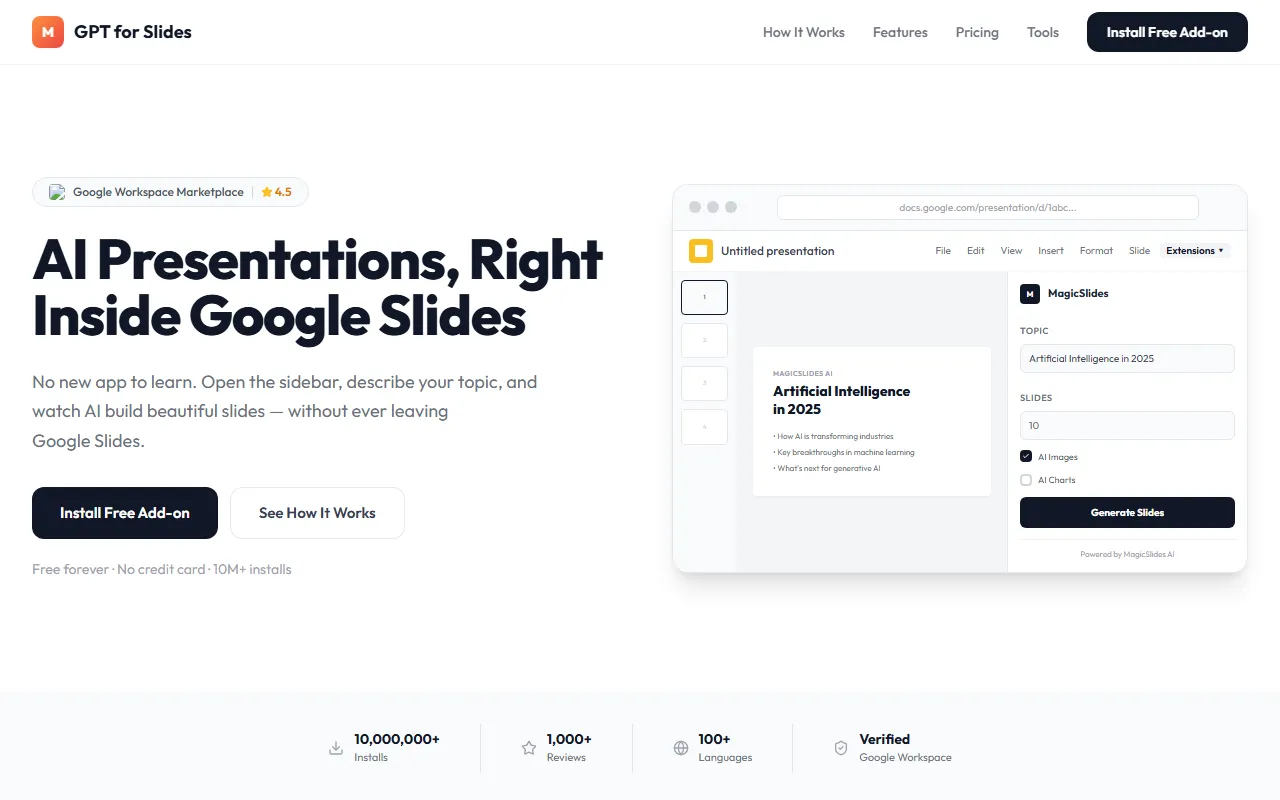
GPTforSlides is an AI presentation generation tool integrated into Google Slides and positioned as a Google Slides add-on. Users do not need to switch to other applications; they only need to enter a topic or provide a content source in the sidebar, and the AI can automatically generate structured slides.
According to the official website information, GPTforSlides supports creating presentation content based on topic descriptions, URLs, PDFs, or YouTube videos, and can automatically complete content extraction, layout design, and partial visual asset generation. It is suitable for scenarios such as daily reports, teaching presentations, meeting preparation, and knowledge organization. For users who want to shorten production time and reduce manual content organization work, this type of tool can significantly improve draft output efficiency.
Key Features
-
Generate presentations directly within Google Slides
- Used as a Google Slides add-on, with no need to learn additional standalone software.
- Topics can be entered through the sidebar to generate slides directly.
-
Supports generation from multiple content sources
- Can create presentations based on topics entered by users.
- Supports extracting information from URLs, PDFs, and YouTube videos and converting it into slide content.
-
AI content summarization and structured organization
- Can automatically refine longer texts or materials into presentation-ready key points.
- Helps quickly form presentation structures for reporting and explanation.
-
Automatic layout and design optimization
- Automatically applies templates, fonts, and layouts, reducing manual formatting time.
- Compared with creating from a blank page, it is more suitable for producing drafts quickly.
-
Supports AI image and chart-related capabilities
- The official website page shows AI Images and AI Charts options.
- Suitable for presentation scenarios that need additional visual expression, but the specific depth of generation depends on the actual product features.
-
Multilingual support
- The official website shows support for 100+ languages, making it suitable for cross-language content organization and presentation.
-
PowerPoint format compatibility
- Generated presentations can be downloaded in Microsoft PowerPoint format.
- They can continue to be opened and edited in environments such as PowerPoint Web.
Product Pricing
According to information captured from the official website, GPTforSlides offers free installation and is labeled Free forever and No credit card. This indicates that the product at least provides a directly usable free version or free basic plan.
However, the currently captured information does not show more detailed paid plans, quota limits, or pricing for advanced features. If you need to know whether there is a professional version, team version, or generation limit, it is recommended to refer to the latest explanation on the official website.
Frequently Asked Questions
Who is GPTforSlides suitable for?
It is suitable for users who need to create presentations quickly, such as workplace reporting staff, teachers, students, training instructors, and team members who need to organize materials for presentations.
Must it be used in Google Slides?
According to the official website description, the core experience of GPTforSlides is using it directly within Google Slides, and it is an extension add-on for Google Slides.
What content can slides be generated from?
The currently confirmed supported input sources include: topic descriptions, web links, PDF files, and YouTube videos.
Does it support exporting to PowerPoint?
Yes. Existing information shows that generated presentations can be downloaded in Microsoft PowerPoint format, making it convenient to continue using them in other office environments.
Is it necessary to install new software?
There is no need to separately learn or install new presentation software. One of its main features is completing content generation and editing within Google Slides through the add-on approach.
Related Tools
View allHayo is an all-in-one tool that brings together multiple AI capabilities, covering areas such as AI art and information, making it convenient for users to experience various AI application capabilities including generation, browsing, sharing, and expression through a single entry point.
Openart is a creative platform that aggregates AI artwork and prompts, featuring a large collection of images generated by models such as DALL·E 2, Midjourney, and Stable Diffusion, and provides AI image generation functions.
Lucidpic is an AI virtual human photo generation tool that can quickly create high-quality portrait stock images and supports adjusting appearance elements such as clothing, hairstyle, style, and age.
Pixian is an AI image background removal tool that supports free, high-resolution processing and can be used without registration, making it suitable for quickly completing cutouts and image background removal.
PimEyes is a facial recognition reverse search engine that can use a photo to find images of similar faces appearing on the internet, and help users learn which websites their photos may have been published on.
ArtHub is a creative community that aggregates AI-generated artworks and prompts, where users can browse, upload, and share AI-generated images, design works, and related creative inspiration.