
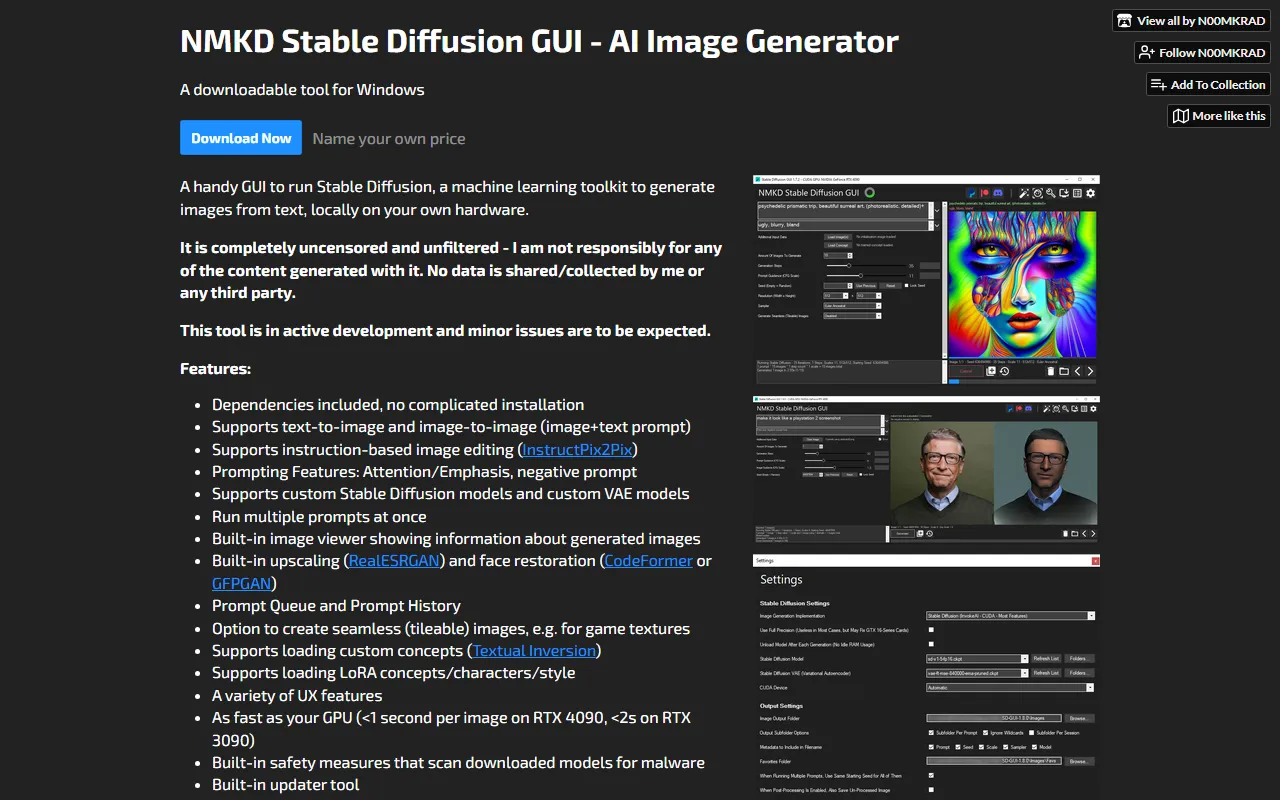
NMKD Stable Diffusion
Image & DesignNMKD Stable Diffusion is a free AI image generation tool that supports text-to-image, image-to-image, instruction-based editing, custom models, and text masking, and provides a convenient installation method.
About
Overview
NMKD Stable Diffusion is a local AI image generation tool for Windows that provides a graphical user interface for Stable Diffusion. Users can run models directly on their own computer and GPU to complete text-to-image, image-to-image, and instruction-based image editing without relying on online services. Its characteristics are a relatively low installation barrier and built-in dependencies, making it suitable for creators, design explorers, and model testing users who want to quickly set up a local image generation environment.
According to the official website information, this tool supports local operation and does not upload user data, and it is continuously being updated. In addition to basic generation capabilities, it also integrates practical features such as custom models, LoRA, Textual Inversion, upscaling, face restoration, and prompt queues, making it suitable for building a relatively complete local AI art workflow.
Key Features
-
Text-to-Image
Generate images from text prompts, suitable for scenarios such as concept art, illustration sketches, and style experiments. -
Image-to-Image
Re-create based on existing images combined with prompts, which can be used for style transfer, detail repainting, and visual iteration. -
Instruction-based Image Editing
Supports InstructPix2Pix and can modify image content through natural language instructions. -
Custom Models and VAE
- Supports loading custom Stable Diffusion models
- Supports custom VAE models
- Supports LoRA
- Supports loading Textual Inversion concepts
-
Prompt Enhancement Capabilities
- Supports prompt weights/emphasis
- Supports negative prompts
- Supports running multiple prompts at once
- Provides Prompt Queue and Prompt History
-
Built-in Post-processing Tools
- Image upscaling: RealESRGAN
- Face restoration: CodeFormer or GFPGAN
- Supports generating seamless tiled images, suitable for uses such as game textures
-
Localized User Experience
- Built-in dependencies for easier installation
- Comes with an image viewer for viewing generated image information
- Built-in updater
- Scans downloaded models for malware
- Generation speed depends on local GPU performance
Pricing
According to the information on the official website page, NMKD Stable Diffusion GUI can be downloaded and used, and the page displays "Name your own price". This usually means that users can obtain it for free, or choose to pay on their own to support the developer.
It should be noted that running the tool depends on a local Windows device and a compatible GPU, so the actual cost of use mainly comes from the hardware configuration.
FAQ
Does it need an internet connection to use?
The core functions can run on local hardware, making it suitable for users who want to complete image generation on their own computer.
What generation methods are supported?
It currently supports text-to-image, image-to-image, and instruction-based image editing.
Does it support custom models?
Yes. Users can load custom Stable Diffusion models, VAE, as well as LoRA and Textual Inversion concepts.
Is it suitable for beginners?
Relatively suitable. It provides a graphical interface and built-in dependencies, reducing complex installation steps, but users are still advised to have a basic understanding of local AI art environments.
What systems are supported?
The official website currently provides a Windows version for download. For system requirement details, refer to its GitHub guide.
Related Tools
View allHayo is an all-in-one tool that brings together multiple AI capabilities, covering areas such as AI art and information, making it convenient for users to experience various AI application capabilities including generation, browsing, sharing, and expression through a single entry point.
Openart is a creative platform that aggregates AI artwork and prompts, featuring a large collection of images generated by models such as DALL·E 2, Midjourney, and Stable Diffusion, and provides AI image generation functions.
Lucidpic is an AI virtual human photo generation tool that can quickly create high-quality portrait stock images and supports adjusting appearance elements such as clothing, hairstyle, style, and age.
Pixian is an AI image background removal tool that supports free, high-resolution processing and can be used without registration, making it suitable for quickly completing cutouts and image background removal.
PimEyes is a facial recognition reverse search engine that can use a photo to find images of similar faces appearing on the internet, and help users learn which websites their photos may have been published on.
ArtHub is a creative community that aggregates AI-generated artworks and prompts, where users can browse, upload, and share AI-generated images, design works, and related creative inspiration.