
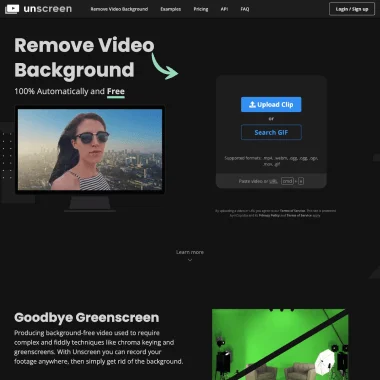
Unscreen.com
Image & DesignUnscreen.com is a video background removal tool that can automatically remove backgrounds from video footage, reduce manual masking steps, and is suitable for quickly processing short videos, presentation content, and creative assets.
About
Overview
Unscreen.com was once an AI tool focused on video background removal, mainly used to automatically separate people or subjects from video backgrounds, reducing the workload of traditional green screen keying and manual frame-by-frame processing. It was suitable for scenarios such as short-form video creation, presentation asset production, and marketing video editing, helping users complete basic background removal workflows more quickly.
According to the latest information on the official website, Unscreen was officially and permanently shut down on December 1, 2025, and is no longer providing services. The official website also directs users to Canva's video editing product as an alternative.
Key Features
Unscreen's past core capabilities were mainly focused on video background removal, with features including:
- Automatically remove video backgrounds: No complex green screen workflow required; backgrounds can be separated directly from existing video footage
- Reduce manual masking steps: Suitable for users who want to shorten post-production time and improve editing efficiency
- Support transparent background output scenarios: Makes it easier to use the background-removed person or subject in other video or design projects
- Suitable for multiple types of content creation:
- Short-form video production
- YouTube video editing
- Marketing and promotional video processing
- Presentation or creative asset production
- Designed for basic fast-processing needs: Better suited to lightweight background removal tasks that prioritize efficiency, rather than complex film-grade compositing workflows
Pricing
According to the currently public information on the official website, Unscreen has ceased operations, and all subscriptions have been canceled, so there is currently no available pricing plan.
The official website further states:
- Existing subscriptions could continue to be used until their respective expiration dates
- Unused minutes or credits would expire when the subscription expires
- The service cannot be reactivated after shutdown
FAQ
Can Unscreen still be used now?
No. The official website has clearly stated that Unscreen has been permanently shut down and no longer provides access or processing services.
When was Unscreen shut down?
According to the official website, Unscreen officially ceased operations at 9:00 AM (CET) on December 1, 2025.
What happens to uploaded video files?
The official statement says that videos are automatically deleted within 30 days after processing is completed. If users want to download videos processed within the past 30 days, they need to contact the official support team.
Are there any alternative products?
Yes. The official website recommends using the Canva Video Editor as an alternative. According to the official website, Canva provides:
- Background removal
- Text-to-video generation
- Auto animation
- Voice enhancement
- Smart format switching
However, these features belong to Canva, not Unscreen's current service capabilities.
How will user data be handled?
The official website states that after the service ends, user data will be deleted or anonymized in accordance with relevant regulations.
Related Tools
View allHayo is an all-in-one tool that brings together multiple AI capabilities, covering areas such as AI art and information, making it convenient for users to experience various AI application capabilities including generation, browsing, sharing, and expression through a single entry point.
Openart is a creative platform that aggregates AI artwork and prompts, featuring a large collection of images generated by models such as DALL·E 2, Midjourney, and Stable Diffusion, and provides AI image generation functions.
Lucidpic is an AI virtual human photo generation tool that can quickly create high-quality portrait stock images and supports adjusting appearance elements such as clothing, hairstyle, style, and age.
Pixian is an AI image background removal tool that supports free, high-resolution processing and can be used without registration, making it suitable for quickly completing cutouts and image background removal.
PimEyes is a facial recognition reverse search engine that can use a photo to find images of similar faces appearing on the internet, and help users learn which websites their photos may have been published on.
ArtHub is a creative community that aggregates AI-generated artworks and prompts, where users can browse, upload, and share AI-generated images, design works, and related creative inspiration.