
Vizcom
Image & DesignVizcom is an AI tool for visual creation that can quickly turn hand-drawn drafts or digital paintings into more vivid dynamic effects, helping creators speed up creative expression and concept presentation.
About
Overview
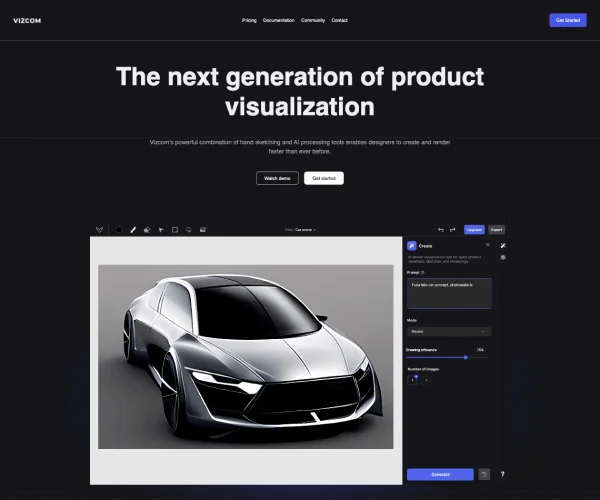
Vizcom is an AI design tool for product design and visual creation workflows. Its core capability is quickly turning sketches into high-fidelity renderings, while supporting multiple rounds of iteration during the concept stage. Users can start from hand-drawn sketches or digital line art and use AI to supplement and refine appearance, materials, colors, and form, making the transition from inspiration to a presentable proposal more efficient.
Compared with traditional workflows that require repeated processing across multiple software tools, Vizcom places more emphasis on a continuous creative experience of "sketch - render - modify - regenerate." It is suitable for product concept design, industrial design presentation, character or illustration concept exploration, and team collaboration scenarios that require rapid output of visual proposals.
Key Features
-
Sketch to high-fidelity rendering
- Can quickly turn hand-drawn drafts or digital sketches into more complete and more realistic visual results.
- The official website highlights its ability to quickly convert from sketch to full-fidelity 3D render.
-
Prompt-based design modification
- Can use text descriptions of the design's form, proportions, colors, materials, and other elements to guide the AI in generating or adjusting results.
- Supports directional editing methods such as "add," "remove," "change," and "imagine."
-
Rapid iteration and concept exploration
- Supports generating different perspectives, different appearance changes, as well as form and color variants.
- Helps quickly compare multiple design directions during the concept stage and shorten solution validation time.
-
Layer- and canvas-based creation
- Based on the interface information on the official website, the product provides workspace capabilities such as canvas, layers, and assets, making it easier to organize design elements in a unified environment.
-
Team collaboration and design workflow support
- Suitable for product design teams to carry out concept communication, proposal presentation, and design advancement.
- Well-suited for connecting digital concepts with physical implementation in real product development scenarios.
-
Import existing drawings
- Supports importing users' own sketches or design drafts to continue rendering and refining on top of existing ideas.
Pricing
According to publicly available information, Vizcom offers a free version and a paid version:
-
Free version
- Supports an unlimited number of files
- Supports unlimited renders
-
Paid version
- Supports team collaboration and management
- Supports unlimited exports
- Supports custom AI models
Specific plan prices and latest benefits may be adjusted, so it is recommended to refer to the official website.
Frequently Asked Questions
-
What type of users is Vizcom better suited for?
- It is better suited for product designers, industrial designers, concept designers, illustration creators, and teams that need to quickly produce visual proposals.
-
What is the core value of Vizcom?
- Its core value lies in shortening the time from sketch to high-quality presentation images, allowing creators to complete creative expression, proposal comparison, and design validation more quickly.
-
Does it support team use?
- Yes. Public information shows that the paid version provides functions related to team collaboration and management.
-
Is Vizcom suitable for early-stage concept design?
- Yes. It is especially suitable for early design stages such as idea exploration, appearance exploration, color variation, and proposal visualization.
Related Tools
View allHayo is an all-in-one tool that brings together multiple AI capabilities, covering areas such as AI art and information, making it convenient for users to experience various AI application capabilities including generation, browsing, sharing, and expression through a single entry point.
Openart is a creative platform that aggregates AI artwork and prompts, featuring a large collection of images generated by models such as DALL·E 2, Midjourney, and Stable Diffusion, and provides AI image generation functions.
Lucidpic is an AI virtual human photo generation tool that can quickly create high-quality portrait stock images and supports adjusting appearance elements such as clothing, hairstyle, style, and age.
Pixian is an AI image background removal tool that supports free, high-resolution processing and can be used without registration, making it suitable for quickly completing cutouts and image background removal.
PimEyes is a facial recognition reverse search engine that can use a photo to find images of similar faces appearing on the internet, and help users learn which websites their photos may have been published on.
ArtHub is a creative community that aggregates AI-generated artworks and prompts, where users can browse, upload, and share AI-generated images, design works, and related creative inspiration.