
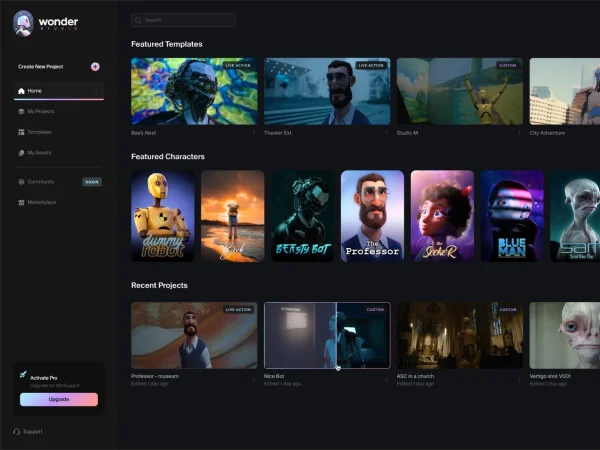
Wonder Dynamics
Image & DesignWonder Dynamics is a project that combines artificial intelligence with cinematic storytelling, focusing on improving character presentation and story expression through technology for creators and teams who want to explore the application of AI in content creation.
About
Overview
Wonder Dynamics is now offered as Autodesk Flow Studio, positioned as an AI creative tool for film, animation, and digital content production teams. It focuses on integrating AI motion capture, camera tracking, character animation, compositing, and 3D asset generation into the same workflow, helping creators convert live-action video into editable CG scenes more efficiently.
Based on publicly available information from the official website, Flow Studio is better suited for creators and teams that need to handle character performance, combining live-action footage with CG, previs production, and animated shot building. Its core value does not lie in a single function of "image generation," but in providing a more complete AI-assisted process around video content production, while supporting subsequent export to mainstream DCC tools and real-time engines for continued refinement.
Main Features
-
AI-powered motion capture
- Can capture performance motion from any video
- Supports transferring body, hand, and facial motion onto characters
- Can be processed using footage from an ordinary camera only
-
Video to controllable 3D scenes
- Can convert live-action video into editable, directable 3D scenes
- Supports adding CG characters into live-action performances, with animation, lighting, and compositing processing
-
3D asset generation
- Generate 3D models through text descriptions or by uploading images
- Can be used to create character or object assets
- The official website mentions that this capability is based on its AI model Wonder 3D
-
Export of editable results
- Supports exporting motion capture data, camera tracking data, clean plates, and other content
- Makes it easier to further adjust in subsequent production and improve the controllability of AI results
-
Integration with existing production workflows
- Can connect with workflows such as Maya, Blender, Unreal, USD
- Supports cloud rendering and collaboration workflows for scaled production
Product Pricing
According to summary information from the official website:
- Offers a Start for free option
- Uses monthly subscription pricing
- The page shows Starting at {{PRICE}} / month, but the specific price number is not displayed in the captured content
It is recommended to refer to the official pricing page for the latest plan and pricing information.
FAQ
-
What product is Wonder Dynamics now?
Based on information from the official website, Wonder Dynamics-related capabilities have been integrated into Autodesk Flow Studio, and the external product name is primarily Flow Studio. -
Who is it suitable for?
It is suitable for teams or individuals in film production, animation production, virtual production, short film creation, advertising content production, and similar fields that need to combine live-action performance with CG characters. -
Can it only generate static images?
No. The official website emphasizes capabilities in motion capture, camera tracking, character animation, compositing, and 3D scene conversion for video and 3D production. -
Can it connect to existing software workflows?
Yes. The official website explicitly mentions support for integration with Maya, Blender, Unreal, and USD workflows. -
Does it support post-production refinement?
Yes. Its editable export capability means users can bring AI-processed results into other professional software for continued improvement.
Related Tools
View allHayo is an all-in-one tool that brings together multiple AI capabilities, covering areas such as AI art and information, making it convenient for users to experience various AI application capabilities including generation, browsing, sharing, and expression through a single entry point.
Openart is a creative platform that aggregates AI artwork and prompts, featuring a large collection of images generated by models such as DALL·E 2, Midjourney, and Stable Diffusion, and provides AI image generation functions.
Lucidpic is an AI virtual human photo generation tool that can quickly create high-quality portrait stock images and supports adjusting appearance elements such as clothing, hairstyle, style, and age.
Pixian is an AI image background removal tool that supports free, high-resolution processing and can be used without registration, making it suitable for quickly completing cutouts and image background removal.
PimEyes is a facial recognition reverse search engine that can use a photo to find images of similar faces appearing on the internet, and help users learn which websites their photos may have been published on.
ArtHub is a creative community that aggregates AI-generated artworks and prompts, where users can browse, upload, and share AI-generated images, design works, and related creative inspiration.